skip to Main Content
Choosing the right Cable Connectors is not a minor detail. It affects signal quality, installation time, safety, and long-term reliability. A loose connector can interrupt a conference display, while a poorly sealed connector may fail inside a damp industrial cabinet.
This guide examines ten widely used connector types, including USB, HDMI, Ethernet, coaxial, XLR, RCA, TRS, D-sub, fiber optic, and terminal block connectors. Each type serves a different purpose. USB connectors support data and power transfer. HDMI connectors carry digital audio and video. XLR connectors remain common in microphones and professional audio systems. Fiber optic connectors use light, making them valuable for high-bandwidth communication over long distances.
Small details matter. Contact materials, locking systems, shielding, pin layout, and environmental ratings can change performance significantly. A gold-plated contact may resist corrosion, but it does not automatically make every connection better. That assumption deserves caution. Connector selection should match the cable, equipment, voltage, bandwidth, movement, and installation environment.
The comparison also considers practical factors, such as repairability, compatibility, physical strength, and ease of testing. Standards and manufacturer specifications should guide final decisions, rather than appearance alone. A connector that fits physically may still carry the wrong signal or power level.
The list is useful, not absolute. New designs and hybrid systems continue to appear. Even experienced installers can overlook a small mechanical mismatch. This overview offers a dependable starting point for identifying the most suitable connector before purchasing, wiring, or troubleshooting a cable system.
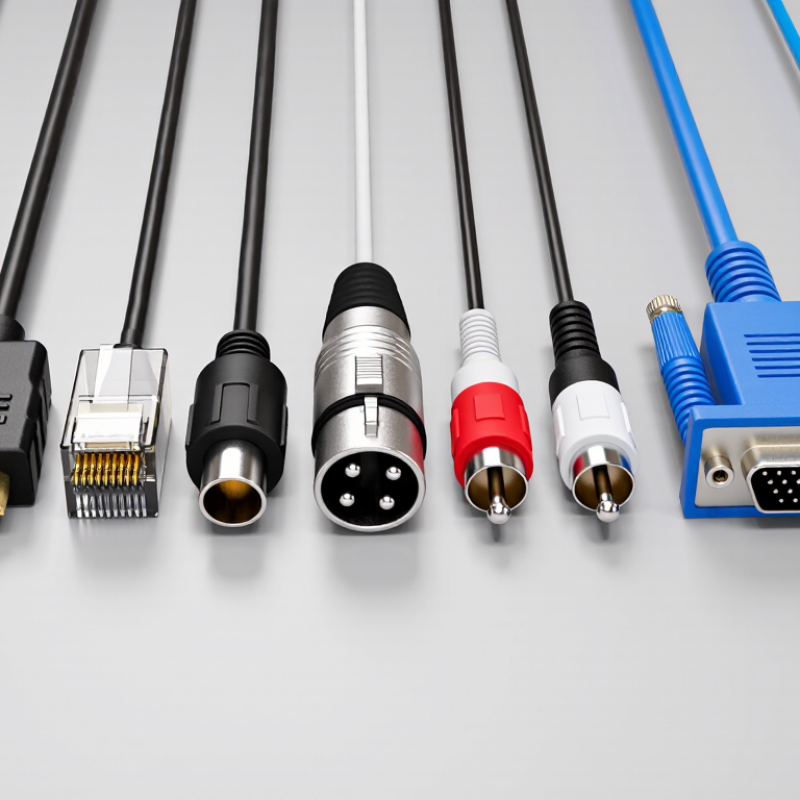
Cable Connector Basics and Classification
Cable connectors join conductors while controlling signal loss, current flow, and mechanical stress. The ten common types are USB, HDMI, DisplayPort, RJ45, coaxial, XLR, TRS, RCA, D-sub, and circular connectors. Each serves a different environment. USB supports power and data. HDMI and DisplayPort carry digital video. RJ45 fits Ethernet networks, while coaxial connectors handle shielded radio-frequency signals.
Classification starts with function, contact design, and installation method. Audio systems often use XLR, TRS, and RCA connectors. Industrial panels may use circular or D-sub connectors because locking shells resist vibration. Coaxial versions depend heavily on impedance matching. A poor match can create reflections and visible signal defects. IEC 60512 testing covers connector performance, including contact resistance, durability, and environmental stress. These tests matter more than appearance.
Market evidence shows why this field keeps expanding. Grand View Research valued the global electrical connectors market at about 84.6 billion dollars in 2023. Its forecast expects continued growth through 2030, driven by vehicles, data centers, and automation. MarketsandMarkets also identifies high-speed data transmission as a major demand area. In practice, I have found that connector selection often begins with the cable, not the socket. That approach is useful, but incomplete. Temperature, bend radius, shielding, and service access can change the correct choice. A connector may fit perfectly and still fail early. Check the standard. Then test the assembly.
Ten common cable connector types serve different electrical, mechanical, and installation needs. USB connectors support data transfer and charging, while USB-C offers reversible insertion. HDMI connectors carry digital audio and video through one compact cable. DisplayPort connectors suit computer displays and support high resolution. RJ45 Ethernet connectors use locking tabs for stable network connections. Fit comes first. A loose plug can cause intermittent signals, even when the cable appears undamaged.
BNC connectors use a quarter-turn locking mechanism and work well with test equipment and video systems. RCA connectors are simple, color-coded, and common in basic audio or composite video connections.
XLR connectors use locking shells and balanced wiring for professional audio. TRS connectors handle headphones, microphones, and balanced signals, depending on their wiring. D-sub connectors have multiple pins and sturdy shells, but their size can limit modern installations.
Fiber-optic connectors, including LC and SC styles, transmit light instead of electrical signals. They resist electromagnetic interference and support long-distance communication. Small details matter. Connector selection should match signal type, voltage, bandwidth, environment, and mating frequency.
In practical installations, I have seen a correct connector fail because dust entered a fiber end face. I have also underestimated cable strain near a crowded panel. Connector standards improve reliability, but inspection and careful routing still matter. No connector is perfect.
What Are the Top 10 Types of Cable Connectors?
Cable connectors differ in shape, contact layout, signal behavior, and power capacity. The ten common types are USB, HDMI, DisplayPort, D-sub, RJ45, coaxial, RCA, XLR, TRS, and DC barrel connectors. USB connectors carry digital data and often deliver low-voltage power. HDMI and DisplayPort transmit digital video and audio through compact, keyed housings.
D-sub connectors remain useful for legacy displays, industrial controls, and serial communication. RJ45 connectors support network data through twisted-pair cables. Coaxial connectors use a central conductor and shield, making them suitable for radio-frequency signals. BNC versions use a locking twist, which helps prevent accidental disconnection. RCA connectors usually carry unbalanced audio or video, but they offer limited noise rejection.
XLR connectors use balanced signal paths and locking shells, so they suit microphones and professional audio equipment. TRS connectors can carry stereo, mono, or balanced audio, depending on their wiring. DC barrel connectors supply low-voltage power, but their dimensions and polarity must match exactly. A plug may fit physically and still damage equipment.
In practical testing, connector choice should follow the signal and load, not appearance. Check voltage, current, impedance, shielding, and insertion cycles. Short cables may hide interference problems. Long cables expose them quickly. I have also seen sturdy connectors fail because their strain relief was poorly installed. That detail deserves more attention. A reliable design considers the socket, cable flexibility, environment, and future servicing needs.
What Are the Top 10 Types of Cable Connectors?
Typical Applications for Each Major Cable Connector Type
Connector choice affects signal quality, safety, and installation time. In field work, I check the device port, cable rating, locking method, and working environment. USB connectors handle charging, data transfer, and peripheral connections. HDMI connectors carry digital video and audio between computers, displays, and media equipment. DisplayPort connectors suit high-resolution monitors and multi-screen workstations. RJ45 connectors support Ethernet networks in offices, control rooms, and home systems. F-type coaxial connectors are common for televisions, antennas, and broadband equipment. BNC connectors use a locking twist and work well with cameras, test instruments, and video systems.
RCA connectors remain useful for simple audio and composite video connections. They often appear on older equipment and short home setups. XLR connectors serve microphones, mixers, and professional audio equipment, where balanced signals reduce interference. TRS connectors support headphones, studio monitors, and balanced audio lines. D-sub connectors connect older displays, industrial controls, and specialized computer equipment. Small details matter. A connector may fit physically but still carry the wrong signal. I have seen loose coaxial fittings create intermittent images after temperature changes. That mistake is easy to miss. Technicians should also inspect bent contacts, damaged shielding, and excessive cable tension before energizing a system.
| No. | Cable Connector Type | Typical Cable or Signal | Typical Applications | Key Characteristics | Common Form Factors |
|---|---|---|---|---|---|
| 1 | RJ45 Ethernet Connector | Twisted-pair copper Ethernet cable, such as Cat5e, Cat6, and Cat6A | Computer networks, switches, routers, patch panels, network cameras, voice-over-IP systems, and industrial Ethernet | Eight contacts; commonly used with balanced differential signaling; may support Power over Ethernet when the cable system and equipment are compatible | Plug, jack, keystone module, field-termination plug, and shielded or unshielded versions |
| 2 | USB Connector | Digital data, power, and peripheral connections | Computers, mobile devices, storage drives, printers, laboratory equipment, charging systems, and embedded electronics | Supports data transfer and power delivery; performance depends on the connector version, cable construction, and host device | Type-A, Type-B, Mini-USB, Micro-USB, and reversible Type-C |
| 3 | HDMI Connector | Digital audio and video over twisted-pair conductors | Televisions, monitors, projectors, media players, game systems, conference-room equipment, and home theater installations | Carries uncompressed digital audio and video; supported resolution, refresh rate, and features depend on the interface specification and cable capability | Standard, Mini, and Micro versions; straight and right-angle cable assemblies |
| 4 | Coaxial BNC Connector | Coaxial cable carrying radio-frequency, video, or test signals | Test and measurement equipment, broadcast video, security cameras, antennas, radio systems, and laboratory instrumentation | Bayonet locking mechanism; available in 50-ohm and 75-ohm versions for different signal and impedance requirements | Straight, right-angle, bulkhead, panel-mount, and crimp or compression termination styles |
| 5 | D-Sub Connector | Multi-conductor analog or digital signals | Industrial controllers, automation equipment, serial communication, older computer interfaces, instrumentation, and control panels | Metal shell provides mechanical protection and shielding; available with different pin counts and mounting hardware | DE-9, DB-15, and DB-25 configurations; plug, socket, panel-mount, and cable-mount versions |
| 6 | XLR Connector | Balanced analog or digital audio; sometimes low-voltage power and control signals | Professional microphones, mixing consoles, stage equipment, recording systems, public-address systems, and broadcast installations | Locking design helps prevent accidental disconnection; balanced wiring improves resistance to common-mode interference | Three-pin audio versions are common; higher-pin-count versions are used for lighting and specialized equipment |
| 7 | RCA Connector | Unbalanced analog audio, composite video, or selected digital audio signals | Home audio equipment, legacy video devices, amplifiers, media players, and laboratory or educational electronics | Simple push-fit connection; typically used for short- to medium-distance consumer and equipment interconnections | Plug and jack versions; color-coded assemblies are often used to distinguish audio and video channels |
| 8 | Fiber Optic LC or SC Connector | Single-mode or multimode optical fiber | Telecommunications, data centers, fiber-to-the-building networks, industrial communication, and high-bandwidth backbone links | Provides high bandwidth and electrical isolation; requires clean end faces and accurate alignment to minimize optical loss | LC uses a compact latch; SC uses a larger push-pull body; simplex and duplex arrangements are available |
| 9 | Circular M12 Connector | Industrial Ethernet, sensor, actuator, power, and control signals | Factory automation, robotics, sensors, machine tools, outdoor equipment, and industrial control cabinets | Compact threaded coupling; many versions provide sealing against dust and water when correctly mated and rated | Straight and right-angle versions with different coding, pin counts, shielding, and field-termination options |
| 10 | Terminal Block Connector | Power, grounding, and low-voltage control wiring | Electrical control panels, power distribution, building systems, industrial machinery, lighting, and printed circuit boards | Allows organized wire termination and convenient testing or maintenance; current capacity depends on contact size, conductor, and spacing | Screw, spring-clamp, pluggable, barrier-strip, DIN-rail, and PCB-mounted versions |
What Are the Top 10 Types of Cable Connectors?
Choosing a cable connector starts with the project environment, not the connector’s appearance. The ten common types include USB, HDMI, coaxial, RJ45, D-sub, circular, terminal block, wire-to-wire, fiber-optic, and audio connectors. Each solves a different problem. USB suits data and low-voltage power. HDMI carries digital video and audio. Coaxial connectors handle shielded radio-frequency signals. RJ45 connectors support structured network cabling. Fiber-optic types offer high bandwidth and strong electrical isolation.
Check four details before selecting one: signal type, current rating, operating environment, and mating frequency. A connector for a vibrating machine needs locking hardware and strain relief. A panel exposed to water may require an IP-rated enclosure. For high-speed data, insertion loss and impedance matter more than a low purchase price. Grand View Research valued the global electrical connectors market at approximately 84 billion dollars in 2023, showing how widely these components support modern equipment. The report also identifies electronics, automotive, and communications as major application areas.
Standards deserve attention. IEC requirements, cable diameter, contact material, and temperature limits should match the assembly. I have seen compact connectors fail because installers ignored bend radius. Small mistake. A neat specification can still be incomplete. Many projects also underestimate service access; a connector that fits once may be awkward during maintenance. Test the chosen cable assembly under real vibration, heat, moisture, and repeated mating conditions. Bishop & Associates reported a global electronic connector industry value near 84 billion dollars in 2023, but market size alone cannot identify the right connector for your specific load or workspace.
